 DashyNMS
Your LibreNMS, in your pocket.
Know the moment something breaks. See what’s down, what’s alerting and why, and deal with it from wherever you are: on call, on site, or away from your desk.
No account to create · Talks only to your server · Nothing tracked
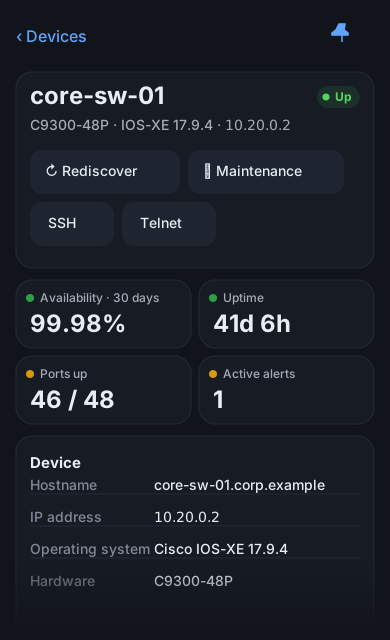
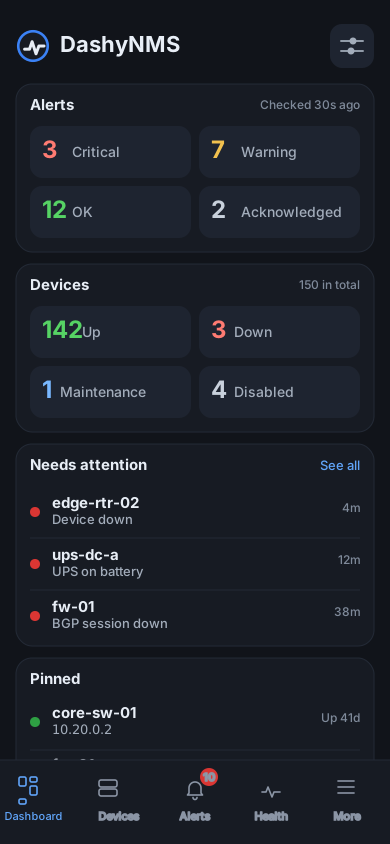
Everything you check at your desk, sized for your hand.
Sign in with your LibreNMS address and an API token, a key you make in LibreNMS or get from your admin, and you’re in.
See what matters first
A dashboard you arrange: open alerts, devices that are down, what needs attention and the devices you’ve pinned.
Alerts, dealt with anywhere
Swipe to acknowledge an alert with a note, so your team knows you’re on it. Filter by severity, or export the list.
Every device, one tap away
Search by name, address, location or group. See whether it’s up, how long it’s been running, and its ports, sensors and neighbours, with more on screen at once on iPad.
Know exactly why it fired
Each alert shows what its rule was looking for, the values that tripped it, and how often it’s happened before.
Notifications and widgets
A notification when an alert fires or clears, the open-alert count on the app icon, and widgets for the home and lock screen.
Take action on the go
Put a device into maintenance before you work on it, ask LibreNMS to check it again, or connect to it straight from the app.
Private by design.
DashyNMS talks to your LibreNMS server and nothing else. There’s no DashyNMS account, no cloud in the middle, and nothing is tracked.
Your token stays on your phone
Your API token is kept in the iPhone keychain or Android keystore, readable only on this device.
Widgets never hold it
Home- and lock-screen widgets show the last alert check’s results, never your credentials.
Discreet on the lock screen
Notifications and lock-screen widgets can keep alert details hidden until you unlock.
Credentials go to your server only
If your server sends the app somewhere else, your token doesn’t go with it, and you’re warned before signing in over an unencrypted connection.
Your LibreNMS, right on your desktop.
DashyNMS Desktop is the full app for Windows, with alert rules, maps and a dashboard you arrange. Both apps share one engine, so pins, dashboards and notifications work the same way, and your phone and your desk always agree.
Get DashyNMS Mobile
Now in TestFlight beta for iPhone and iPad.